

Disabling Pop-Up Blocker and Enabling PeopleSoft Pop-ups
The following instructions will guide you through the process which allows you to view pop-ups on PeopleSoft systems.
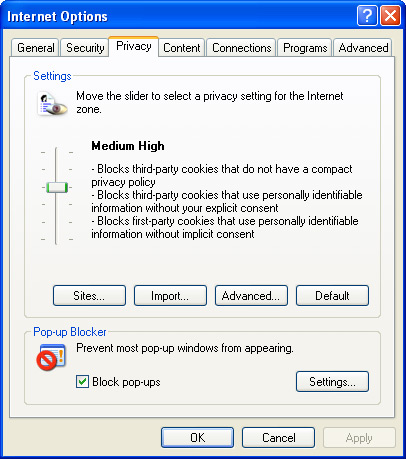
1. Open Internet Explorer and select Tools > Internet Options.
2. Click the Privacy tab.
3. Click the Settings button at the bottom right. Make sure Block pop-ups is selected.
4. Type "case.edu" in the Address of Web site to allow field.
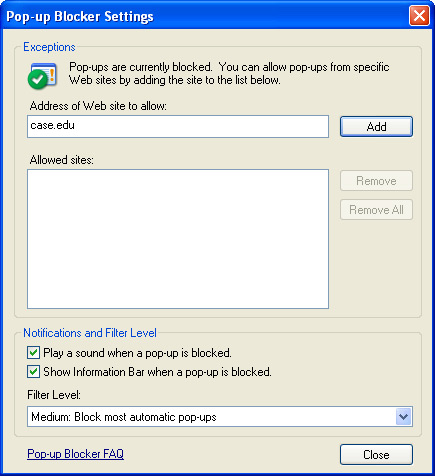
5. Click the Add button. Under Allowed Sites you should see: *.case.edu
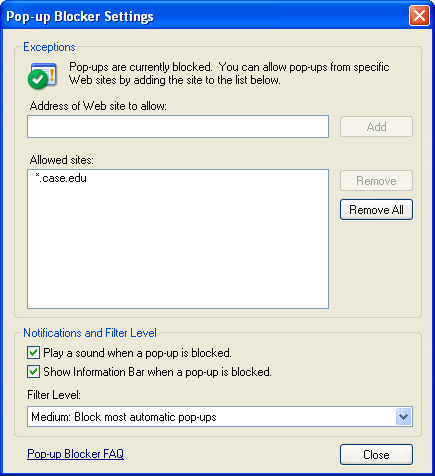
6. Make sure the Show Information Bar when a pop-up is blocked checkbox is selected.
7. Click Close.
8. Click OK.